

Contact us for technical support
Need help with Cloudflare verification or a DataDome CAPTCHA solver integration? Share an authorized target URL, challenge type, response status and session requirements so support can confirm compatibility. Redact API keys and private cookies from examples.
Support email: support@cloudbypass.com
Scrapingbypass Onboarding Workflow
1.Create Your Account
Register a Scrapingbypass API account - Sign Up Now
Register a Scrapingbypass Proxy account - Sign Up Now
One account gives you API and proxy access. Log in within 30 days and open Trial Activity from the gift icon to claim trial credits and traffic.
2.Test with the Code Generator
Use the Code Generator to configure and test Cloudflare or DataDome requests. Both use the same integration logic and request code. Keep the proxy IP, cookies and session consistent.
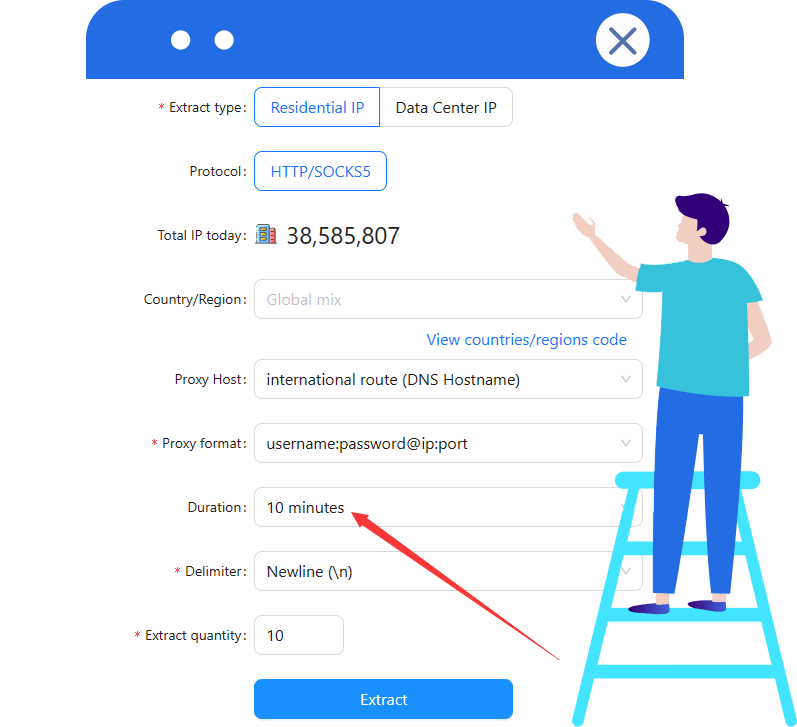
V1 includes a rotating proxy. V2(s) requires a stable proxy IP; configure a sticky session of at least 10 minutes when using Scrapingbypass rotating proxies.
For assistance, see the API documentation or contact Scrapingbypass Support.
3.Integrate the Scrapingbypass API
Integrate your tested request code into the application. Cloudflare and DataDome share the same API integration and call pattern. Validate response status and content before parsing, pagination or automation.
4.Select a Pricing Plan
After testing, choose a plan based on your usage. Cloudflare and DataDome share the same API credits, consumption rules and pricing. View Pricing
For proxy traffic, select a Rotating Datacenter or Rotating Residential proxy plan.
Cloudflare and DataDome challenge handling consume API credits; some workflows also need a proxy. API credits and proxy traffic are billed separately. A proxy connection does not replace CAPTCHA handling.
Scrapingbypass Help Center
Common Issues with Scrapingbypass API: Point rules, V2(s) version, maximum concurrency. Global IPs billed by traffic package, support multiple payment methods. Tutorials cover bypassing Cloudflare, HTTP API, global Rotating Proxy, Anti-Detection Browser, and multi-platform configuration.
Common Issues with Cloudflare Bypass API
Scrapingbypass API Points Usage Concise Rules: 1 point per successful request, V2(s) version consumes 3 points. Points expire monthly and reset; recharge is separate. V2(s) supports JS polling, requires time-limited Proxy purchase. Max concurrent requests: 20/s. 403 or Access Denied may require Proxy configuration. Not compatible with selenium or Puppeteer; can be used with Anti-Detection Browsers and collectors.
View More
Common Issues with Scrapingbypass Global Proxy
Scrapingbypass global Proxy is billed by data package, never expires. Supports payment methods such as Alipay, USDT. Data package usage includes upload + download data. Provides dynamic residential and Data Center Proxys, supports http and Socks5 proxy protocols. Free trial available after registration. Chinese users need to use it in Global environments as direct connection to mainland China IP is not supported.
View More
Tutorial for Using Scrapingbypass API/Proxy
Bypass Cloudflare effortlessly with Scrapingbypass API for unhindered web data collection. It offers HTTP API and global Rotating Proxy services, supporting customizable browser fingerprints like Referer and UA for enhanced control. Scrapingbypass IP service settings cover FAQs, IP extraction tutorials, Anti-Detection Browsers, computer browsers, and mobile platforms. Detailed guides include configurations for various browsers and platforms.
View More